Building the First Vulkan Frame

Swapchain, Command Buffers, Synchronization and Presentation
Welcome to the third STAGE VK development update. In the previous post, I completed the first stage of the Vulkan backend: creating the Vulkan instance, enabling validation, creating the window surface, selecting a physical device, discovering the required queue families and finally creating the logical device and its queues.
At that point, STAGE VK was connected to the GPU, but it still could not actually produce a frame. The next step was therefore to build the infrastructure required to go from:
“I can access the GPU”
to:
“I can send work to the GPU and display the result.”
The goal for this stage was intentionally simple: clear the window with a solid colour.
Visually, that does not sound particularly impressive. Internally, however, reaching that point requires introducing some of the most important concepts behind modern explicit graphics APIs: swapchains, command buffers, resource transitions, GPU queues and CPU-GPU synchronization.
Refactoring the Vulkan Backend
Before adding more Vulkan objects, I decided to reorganize the backend.
Originally, most of the Vulkan initialization lived directly inside the VulkanModule. That was manageable while the module only contained the instance, surface and device setup, but adding swapchain resources, command infrastructure and synchronization would quickly turn it into a very large class.
Instead, I kept VulkanModule as the orchestrator and extracted the main Vulkan responsibilities into smaller classes.

The current architecture is centered around four systems:
VulkanDevice manages the selected GPU, the logical device and the queues used to communicate with it.
VulkanSwapchain manages the images that can eventually be displayed in the application window.
VulkanCommandContext manages the resources used to record instructions for the GPU.
FrameContext stores the synchronization objects needed to coordinate CPU, GPU and presentation work.
VulkanModule then connects all of them and determines the order in which those systems are used. This distinction became useful very quickly: the helper classes manage their own Vulkan resources, while the module describes the higher-level frame lifecycle.
VulkanDevice - Accessing the GPU
The first extracted class was VulkanDevice.
In Vulkan, a physical device represents an available GPU. It is essentially a piece of hardware that the application can inspect before deciding whether it is suitable.
The engine checks whether a candidate GPU provides the capabilities it currently needs, including graphics execution, presentation support and the swapchain extension.
Before creating a logical device, Vulkan also exposes queue families.
A queue family represents a group of GPU queues capable of particular kinds of work. For STAGE VK, I currently need two capabilities: executing graphics commands and presenting images to the window.
Those capabilities may come from the same queue family or from different ones.
Once a suitable physical device has been selected, STAGE VK creates a logical device.
The physical device answers: Which GPU am I using?
The logical device answers: How will my application use that GPU?
The logical device is then used to retrieve the graphics and presentation queues.
A queue can be thought of as a submission channel to the GPU. Later, recorded commands will be submitted to the graphics queue, while completed images will be sent through the presentation system.

VulkanSwapchain - Images That Can Reach the Screen
Having access to the GPU is still not enough to display anything. The engine needs images where frames can be produced and later shown in the application window. That is the purpose of the swapchain.
A swapchain manages several presentable images. Rather than continuously modifying the exact image currently being displayed, the rendering system works with a set of images that can be acquired, modified and presented over time.
When creating the swapchain, STAGE VK first queries what the window surface and GPU support. This includes the available image formats, presentation modes and valid image dimensions. The engine then chooses an appropriate configuration and creates a VkSwapchainKHR. Once created, Vulkan provides the swapchain images.
These VkImage objects are effectively the backbuffers used to produce frames.
An important ownership detail is that STAGE VK does not create those images directly. They belong to the swapchain. The engine only retrieves their handles.
For each swapchain image, however, STAGE VK creates a corresponding image view.
A useful distinction is:
VkImage is the resource.
VkImageView describes how that resource will be accessed.
In the current implementation, each image view represents the complete swapchain image as a 2D colour image.

VulkanCommandContext - Telling the GPU What to Do
The next problem is command execution. Modern explicit graphics APIs do not generally work by immediately executing every rendering call made by the CPU. Instead, the CPU records commands first. Those commands are later submitted to the GPU.
STAGE VK now uses a VulkanCommandContext containing a command pool and a command buffer. The command pool manages the memory used by command buffers. The command buffer stores the actual sequence of GPU instructions.
When the application records a Vulkan command, it is essentially building a list of instructions such as:
Prepare this image for writing.
Clear it.
Prepare it for presentation.
Only when that command buffer is submitted to a queue does the GPU receive the work for execution.

This is the Vulkan equivalent of the recorded command model introduced in the DirectX 12 through command allocators, command lists and command queues.
Image layouts and barriers
The first and third commands in that sequence introduce another important Vulkan concept: image layouts.
A GPU image can be used for different purposes, such as rendering, copying, shader access, depth storage or presentation. Vulkan requires the application to explicitly describe how an image is going to be used. For the current clear operation, the acquired swapchain image follows this simplified lifecycle: Undefined → Transfer Destination → Present
The image is first transitioned into a layout suitable for the clear operation. After the clear has been recorded, it is transitioned again into the layout required by the presentation system. These transitions are expressed through barriers, which tell Vulkan when a resource
changes from one type of usage to another.

At this stage I only use them for the basic swapchain clear, but this concept will become increasingly important as the renderer starts sharing resources between different rendering stages and passes.
FrameContext — Synchronizing CPU and GPU
Synchronization was probably the most important conceptual part of this implementation.
The CPU and GPU operate independently.
The CPU can prepare work while the GPU is still executing previously submitted commands.
That is useful for performance, but it also means the CPU cannot simply assume that a resource is free to reuse.
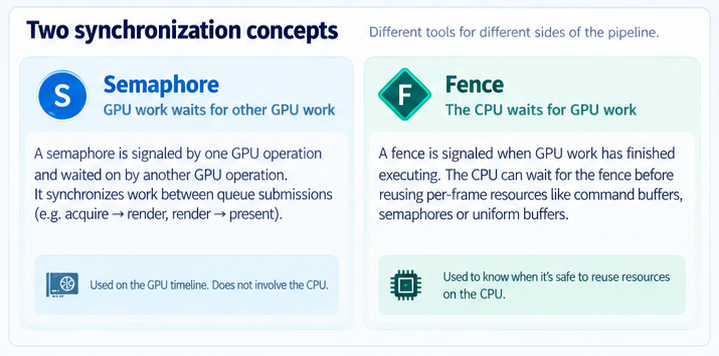
STAGE VK currently uses two synchronization concepts: semaphores and fences.
Semaphores coordinate GPU operations.
The first semaphore tells rendering work that a swapchain image has become available.
The second tells presentation that rendering involving that image has finished.

A fence solves a slightly different problem. It allows the CPU to know when GPU work has completed. Before reusing the command buffer for another frame, the CPU waits for the previous submitted work to finish.
I also ran into a useful synchronization bug while implementing this.
My first version reused a single render-finished semaphore for every swapchain image. Vulkan Validation reported that the presentation system could still be using that semaphore when the graphics queue attempted to signal it again.
The fix was to associate a render-finished semaphore with each swapchain image.
It was a good example of why Vulkan's Validation Layers are so useful while learning the API: the application appeared to work visually, but the synchronization was still incorrect.
Putting Everything Together: The First Frame
Once all these pieces existed, VulkanModule could finally orchestrate a complete frame.
At the beginning of the frame, the CPU first waits until the previous GPU work is finished.
The engine then asks the swapchain for an available image.
Vulkan returns an image index identifying which swapchain image belongs to the current frame. The command buffer is reset and recording begins.
STAGE VK currently records only three meaningful operations:
Prepare the acquired image for writing.
Clear the entire image with a solid colour.
Prepare the image for presentation.
The command buffer is then submitted to the graphics queue.
That submission waits until the acquired swapchain image is available.
Once the GPU finishes executing the command buffer, it signals the render-finished semaphore associated with that swapchain image.
The presentation queue waits for that signal and finally presents the image.
Conceptually, the complete frame now looks like:
Acquire → Record → Submit → Execute → Present
This is the first point in the project where STAGE VK is actually sending rendering work to the GPU.
Handling Window Resize
The swapchain is closely tied to the size of the window framebuffer.
If the window changes size, the existing swapchain may no longer match the surface.
STAGE VK therefore detects framebuffer resize events and marks the swapchain for recreation.
Before rebuilding it, the engine waits for the GPU to finish using the old resources.
The old swapchain resources and their synchronization objects can then be destroyed and recreated using the new framebuffer dimensions.
Importantly, this does not require rebuilding the entire Vulkan backend.
The Vulkan instance, selected device and queues remain valid.
Only the resources whose configuration depends on the swapchain need to be recreated.
This corresponds to the resize considerations introduced at the end of the DirectX 12 exercise, where swapchain-dependent render resources must also be recreated when the window changes size.
Result

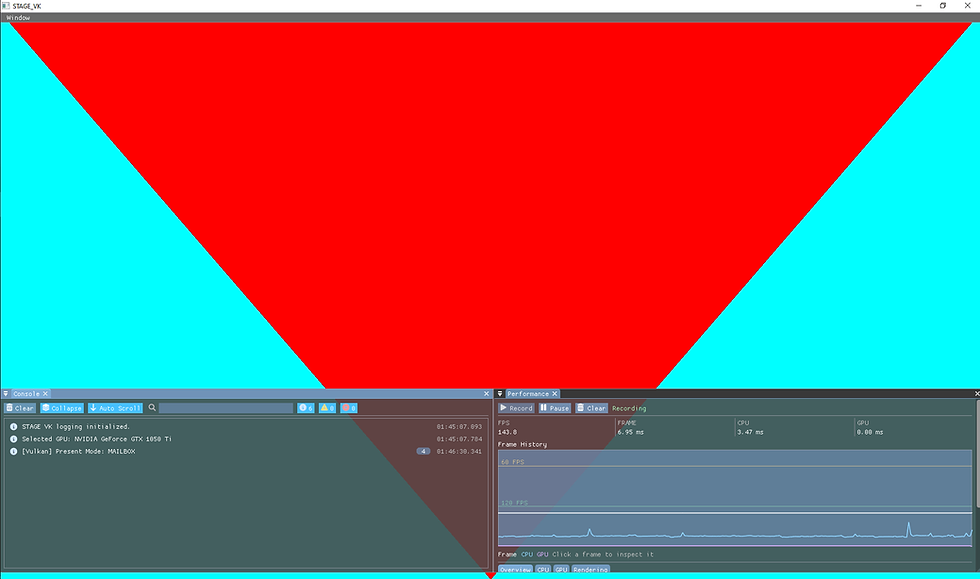
The result of this stage is intentionally simple: a completely cyan window.
But that cyan frame now passes through the basic Vulkan rendering lifecycle.
STAGE VK can:
acquire a presentable image, record GPU commands, synchronize CPU and GPU work, submit commands to a graphics queue and finally present the completed image to the window.
The most useful thing I learned from this stage is that rendering is not simply a sequence of drawing functions.
In an explicit API such as Vulkan, a large part of the renderer is about describing resources, recording work, controlling when that work is allowed to execute and managing the lifetime of everything involved.
The architecture also feels significantly clearer now.
VulkanDevice answers which GPU is being used and how work reaches it.
VulkanSwapchain answers which images can be shown on screen.
VulkanCommandContext answers where GPU instructions are recorded.
FrameContext answers when those operations are safe to perform.
And VulkanModule brings all of those pieces together into a frame.
The next stage can finally start building on top of this infrastructure rather than working on Vulkan initialization itself.


Comments