STAGE VK - First Graphics Pipeline

After finishing the buffer and upload infrastructure, the next step was finally connecting that work to the graphics pipeline.
Until now, STAGE VK could create a Vulkan device, manage the swapchain, record command buffers, render Dear ImGui and upload data to GPU buffers, but it still had no rendering path of its own. This implementation changes that.
The goal was simple: render the first triangle using a vertex buffer, custom shaders and a Vulkan graphics pipeline, while integrating everything into the existing renderer architecture instead of building it as an isolated example.
GeometryPass
The first step was adding a dedicated `GeometryPass`. As the renderer grows, `RenderModule` should not contain the implementation details of every rendering operation. Its role is to orchestrate the frame: deciding which passes run and in what order. Individual passes are responsible for recording the GPU work required for a specific stage of rendering. `GeometryPass` is the first example of this separation. Its responsibility is to render scene geometry through the graphics pipeline. For now, that means owning the GPU resources required by a single test triangle, configuring its graphics pipeline and recording the commands needed to draw it. Conceptually, the relationship is:
 ```text
RenderModule
│
│ orchestrates
↓
GeometryPass
│
├─ Geometry resources
├─ Graphics pipeline
└─ Draw commands
GeometryPass is not intended to become a model loader, mesh database or asset manager. Those systems will eventually be responsible for creating and managing geometry data, while GeometryPass will consume that data when it needs to be rendered.
This distinction is important because the same geometry may eventually be used by several rendering stages. A mesh could, for example, be rendered once by a shadow pass to generate a shadow map and later by GeometryPass to produce the visible scene.
For this first implementation, however, there is no mesh or asset system yet. The pass owns a single hardcoded triangle so the rendering path can be built and validated with the smallest possible amount of geometry:
struct Vertex
{
    float x;
    float y;
    float z;
};
Vertex vertices[3] =
{
{ -1.0f, -1.0f, 0.0f },
{ 0.0f, 1.0f, 0.0f },
{ 1.0f, -1.0f, 0.0f }
};The vertex buffer is created as a GPU-oriented resource with:
VK_BUFFER_USAGE_TRANSFER_DST_BIT | VK_BUFFER_USAGE_VERTEX_BUFFER_BITVK_BUFFER_USAGE_TRANSFER_DST_BIT allows the buffer to receive data through the staging upload path, while VK_BUFFER_USAGE_VERTEX_BUFFER_BIT declares that the buffer will later be consumed as vertex input by the graphics pipeline.
The triangle data is uploaded using the synchronous staging infrastructure implemented in the previous chapter:
CPU triangle data
        ↓
Staging Buffer
        ↓
GPU copy
        ↓
Vertex Buffer
        ↓
GeometryPass
This means the first geometry rendered by STAGE VK is already using the same low-level buffer and upload infrastructure that future meshes and imported models will be able to build on.
Shader Modules
The next step was introducing shader support.
Shaders are the programmable stages of the graphics pipeline. For this first rendering path, STAGE VK only needs two of them: a vertex shader to process each vertex of the triangle and a fragment shader to determine the final color of the generated fragments.
The vertex shader is intentionally minimal:
```hlsl
struct VSInput
{
    [[vk::location(0)]] float3 position : POSITION0;
};

float4 main(VSInput input) : SV_POSITION
{
    return float4(input.position, 1.0f);
}
The triangle positions are already stored in clip space, so no model, view or projection transforms are required yet. The shader simply forwards the position to the next stages of the graphics pipeline.
The fragment shader is even simpler:
float4 main() : SV_TARGET0
{
    return float4(1.0f, 0.0f, 0.0f, 1.0f);
}
Every fragment generated by the triangle therefore produces the same red output color.
The shaders are written in HLSL, but Vulkan does not consume HLSL source directly. They are compiled offline with DXC into SPIR-V, the binary shader representation consumed by Vulkan:
HLSL
  ↓
DXC -spirv
  ↓
SPIR-V
  ↓
VkShaderModule
To integrate this cleanly into the engine, I added a small VulkanShaderModule RAII wrapper.
Its responsibility is deliberately narrow: load a compiled .spv file, create the corresponding VkShaderModule, and release it when it is no longer needed.
.spv file
    ↓
VulkanShaderModule
    ↓
VkShaderModule
The VkShaderModule objects are only required while the graphics pipeline is being created. Once Vulkan has used them to create the pipeline, the modules can be destroyed while the resulting pipeline remains valid.
This keeps shader module ownership simple and temporary, while the long-lived rendering state remains inside GeometryPass.
```text
Vertex Buffer
    ↓
Vertex Shader
    ↓
Rasterization
    ↓
Fragment Shader
First Graphics Pipeline
With the shaders ready, the next step was creating the first Vulkan graphics pipeline used by STAGE VK. A graphics pipeline defines how vertex data moves through the programmable and fixed-function stages of the GPU. Instead of configuring most of this state individually before every draw, Vulkan groups it into a `VkPipeline` that can later be bound to a command buffer.

For this first triangle, the pipeline defines: - Vertex and fragment shader stages - Vertex input layout - Triangle-list primitive topology - Rasterization state - Multisampling state - Depth and stencil state - Color output and blending state - Dynamic viewport and scissor state - Pipeline layout - Render pass and subpass compatibility The vertex input currently contains a single attribute: ```text Location 0 VK_FORMAT_R32G32B32_SFLOAT
This describes three 32-bit floating-point values and maps directly to the float3 position consumed by the vertex shader:
Vertex
{ x, y, z }
      ↓
Vertex Input
Location 0 / R32G32B32_SFLOAT
      ↓
Vertex Shader
float3 position
The pipeline layout is intentionally empty for now because the shaders do not yet use descriptor sets or push constants. Textures, uniform buffers and other shader resources will be introduced later.
Depth testing is also disabled at this stage because the scene contains only a single triangle and no depth buffer has been introduced yet.
Viewport and scissor are configured as dynamic states. The pipeline therefore defines that one viewport and one scissor rectangle will be used, while their actual dimensions are provided when recording the frame.
This allows the same pipeline configuration to adapt to the current swapchain extent without storing the window dimensions directly inside the pipeline.
Drawing the Triangle
Once the graphics pipeline existed, the remaining step was connecting it to the frame command buffer and issuing the first draw call.
GeometryPass now records the commands required to render its geometry:
vkCmdBindPipeline(...);
vkCmdSetViewport(...);
vkCmdSetScissor(...);
vkCmdBindVertexBuffers(...);
vkCmdDraw(...);
Each command contributes one part of the draw state.
vkCmdBindPipeline selects the graphics pipeline that will process the geometry. The viewport and scissor define the framebuffer region used for rendering, while vkCmdBindVertexBuffers connects the triangle's vertex buffer to the vertex input stage.
Finally, the draw command submits three vertices and one instance:
vkCmdDraw(commandBuffer, 3, 1, 0, 0);Because the pipeline uses VK_PRIMITIVE_TOPOLOGY_TRIANGLE_LIST, those three vertices are assembled into a single triangle.
The render order is now:
Begin Render Pass
        ↓
GeometryPass
        ↓
ImGuiPass
        ↓
End Render Pass
This also means the editor UI is rendered after the scene geometry and therefore appears on top of it.
At this point, the complete path of the triangle through STAGE VK is:
Vertex Buffer
      ↓
Vertex Input
      ↓
Vertex Shader
      ↓
Primitive Assembly
      ↓
Rasterizer
      ↓
Fragment Shader
      ↓
Color Attachment
      ↓
Present
And STAGE VK finally renders its first piece of geometry through its own graphics pipeline.
Pipeline Lifetime
Rendering the triangle also introduced a new lifecycle consideration.
Not every resource owned by GeometryPass has the same lifetime.
The vertex buffer contains the geometry itself and is independent from the swapchain. Resizing the window does not change the triangle data, so recreating and uploading that buffer again would be unnecessary.
The pipeline layout is also persistent because it does not depend on the swapchain dimensions or render targets.
The graphics pipeline, however, is created for the render pass configuration used by the renderer. Since STAGE VK currently rebuilds its main render pass during swapchain recreation, GeometryPass also rebuilds its graphics pipeline as part of that lifecycle.
The ownership therefore becomes:
GeometryPass
│
├─ Vertex Buffer        persistent
├─ Pipeline Layout      persistent
└─ Graphics Pipeline    rebuilt with render-pass resources
During swapchain recreation, RenderModule first asks GeometryPass to release its graphics pipeline before the old render targets and render pass are destroyed.
Once the new render pass and framebuffers have been created, GeometryPass builds a new graphics pipeline for the updated rendering configuration.
The vertex buffer and pipeline layout remain untouched throughout the process.
Resize
  ↓
Destroy Graphics Pipeline
  ↓
Recreate Swapchain / Render Pass / Framebuffers
  ↓
Create Graphics Pipeline
Keeping these lifetimes separate avoids recreating persistent GPU data unnecessarily and establishes a useful distinction between scene resources and render-target-dependent state.
Result
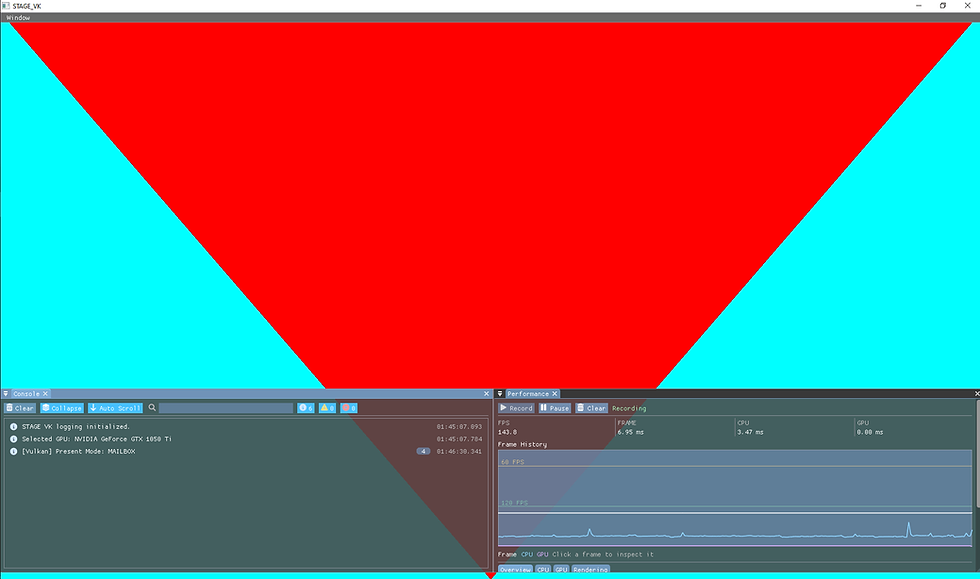
STAGE VK now has its first complete custom graphics path.
The engine can now:
- Upload vertex data to GPU memory
- Compile HLSL shaders to SPIR-V
- Create Vulkan shader modules
- Describe vertex input
- Build a Vulkan graphics pipeline
- Bind pipeline state and vertex buffers
- Record and submit draw commands
- Render scene geometry before the editor UI
- Rebuild render-pass-dependent pipeline state during swapchain recreation
The visible result is intentionally simple: a single red triangle.
What matters is the path behind it. The triangle is rendered using the engine's own buffer infrastructure, shader modules, graphics pipeline and render pass integration rather than through a temporary standalone example.
This marks an important transition for STAGE VK. Until this point, most of the work had focused on building the Vulkan backend, frame lifecycle, resource infrastructure and editor tooling. The renderer can now use those systems together to submit and display its own geometry.
The triangle itself is only the first test case, but the rendering path behind it is the foundation that future meshes, materials and rendering passes can build on.


Comments