Editor Tools: Introducing the Debug Console

The editor console was implemented as the first dedicated debugging tool for STAGE VK.
Until this point, engine messages were mainly exposed through the native application console. While this was sufficient during the first stages of development, it was not a practical solution for an editor-oriented workflow. Vulkan validation messages, engine diagnostics and general runtime information needed to be accessible directly from the editor and presented in a way that could be filtered and inspected quickly.
The resulting system introduces a centralized logging architecture backed by spdlog, an in-memory log sink and a dedicated ImGui console panel.
1. Logging Architecture
Rather than making the editor console responsible for producing or storing messages, logging was separated from the user interface.
Engine systems write messages through a small Log abstraction using severity-specific macros such as:
LOG_INFO(...)
LOG_WARN(...)
LOG_ERROR(...)
LOG_CRITICAL(...)
Internally, the logger distributes each message to multiple sinks.
One sink writes formatted output to the native console, while a custom MemoryLogSink stores the same messages as structured LogEntry objects.
Each entry contains:
Severity
Timestamp
Message
Source file
Source line
Function
This keeps logging independent from the editor itself. The renderer, Vulkan validation callback or any future engine system can generate messages without needing to know that an ImGui console exists.
The resulting flow is approximately:

2. Editor Console
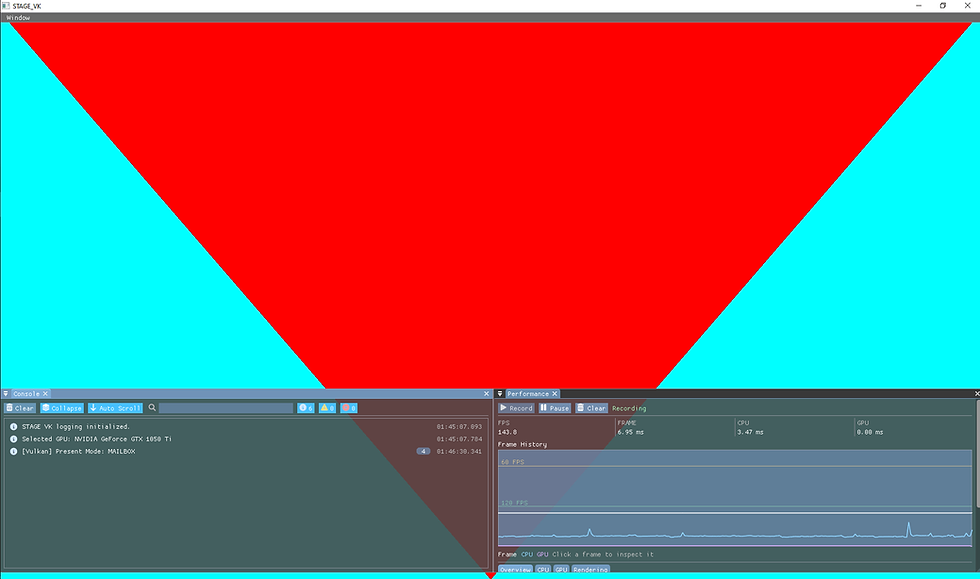
ConsolePanel acts purely as the visualization layer for the stored log history.
The panel retrieves the entries captured by MemoryLogSink and presents them as an editor tool with several controls for navigating runtime information.
The console currently supports:
Info, warning and error filtering
Text search
Automatic scrolling
Clearing the log history
Collapsing repeated messages
Message counters by severity
Timestamp display
Selection of individual messages
Source file and line information
Function information
Copy-to-clipboard support
Repeated messages can also be collapsed into a single row while keeping an occurrence counter. This is particularly useful for validation or runtime warnings that may otherwise generate hundreds of identical entries.
Selecting an entry opens a details area containing the complete message together with its timestamp, severity and available source-location information.
3. ImGui Integration
The console is integrated into the existing editor rendering path rather than operating as an independent windowing system.
Dear ImGui is initialized by ImGuiPass, which owns the GLFW and Vulkan backend integration. At the beginning of an editor frame, ImGui prepares a new UI frame. Editor modules can then submit their widgets, including the Console, before the generated ImGui draw data is finally recorded into the active Vulkan command buffer.
Conceptually, the editor UI follows this sequence:
ImGuiPass::StartFrame()
        |
EditorModule
        |
ConsolePanel::Draw()
        |
ImGui::Render()
        |
ImGuiPass::Record()
        |
Vulkan Command Buffer
This keeps individual editor panels independent from Vulkan command recording. ConsolePanel only describes its interface through ImGui, while ImGuiPass remains responsible for translating the resulting ImGui draw data into Vulkan rendering commands.
4. Editor Icons and Third-Party Fonts
The first version of the Console used icons drawn manually through ImGui's ImDrawList.
Although this worked, every icon required its own geometry and drawing code, making the interface unnecessarily difficult to maintain as more editor tools are introduced.
The final implementation replaces these manually constructed shapes with Font Awesome Free Solid icons.
Font Awesome is loaded as an additional font into Dear ImGui's font atlas and merged with the default ImGui font. This allows icons to be treated as glyphs and used directly alongside normal text.
The Console currently uses these icons for actions and severity indicators such as:
Clear Collapse Auto Scroll Search Information Warning Error Copy
This also establishes a reusable icon set for future STAGE VK editor panels instead of requiring each tool to implement its own visual symbols.
Dear ImGui explicitly supports merging icon fonts into its font atlas, which is the mechanism used here for the Font Awesome integration.
Final Result

The completed Console provides STAGE VK with an editor-integrated debugging interface while keeping the logging system independent from the UI.
Runtime messages, Vulkan validation output and future engine diagnostics can all use the same logging path, while the Console provides filtering, inspection and source information without requiring individual systems to interact with ImGui directly.
The implementation also establishes two reusable pieces of editor infrastructure: a centralized logging backend that future tools can consume and a shared icon font that can be reused across the rest of the editor interface.


Comments